This is a partial user and operations guide. The full guide is available to platform subscribers and active users only. We publish this public selection so evaluators get an initial sense of capabilities and workflows. Private guide content may change with ongoing product improvements.
Institutions
An institution is a versioned YAML spec: departments (= hosts), profiles, A2A trust. The architect proposes. The human approves. The gated arm applies. The service never provisions on its own.
Operate views (screenshots)
| View | Guide |
|---|---|
| Template catalog | operar-vistas/catalogo-plantillas |
| Provisioning | operar-vistas/provisionamiento |
| Dev (Fresh Reset) | (Dev view only in authenticated internal guide) |
Full index: Console — Operate.
Prepare → Approve → Deploy cycle
Canonical flow (not Admin → Approvals):
- Catalog →
ldteamtemplate → Prepare.
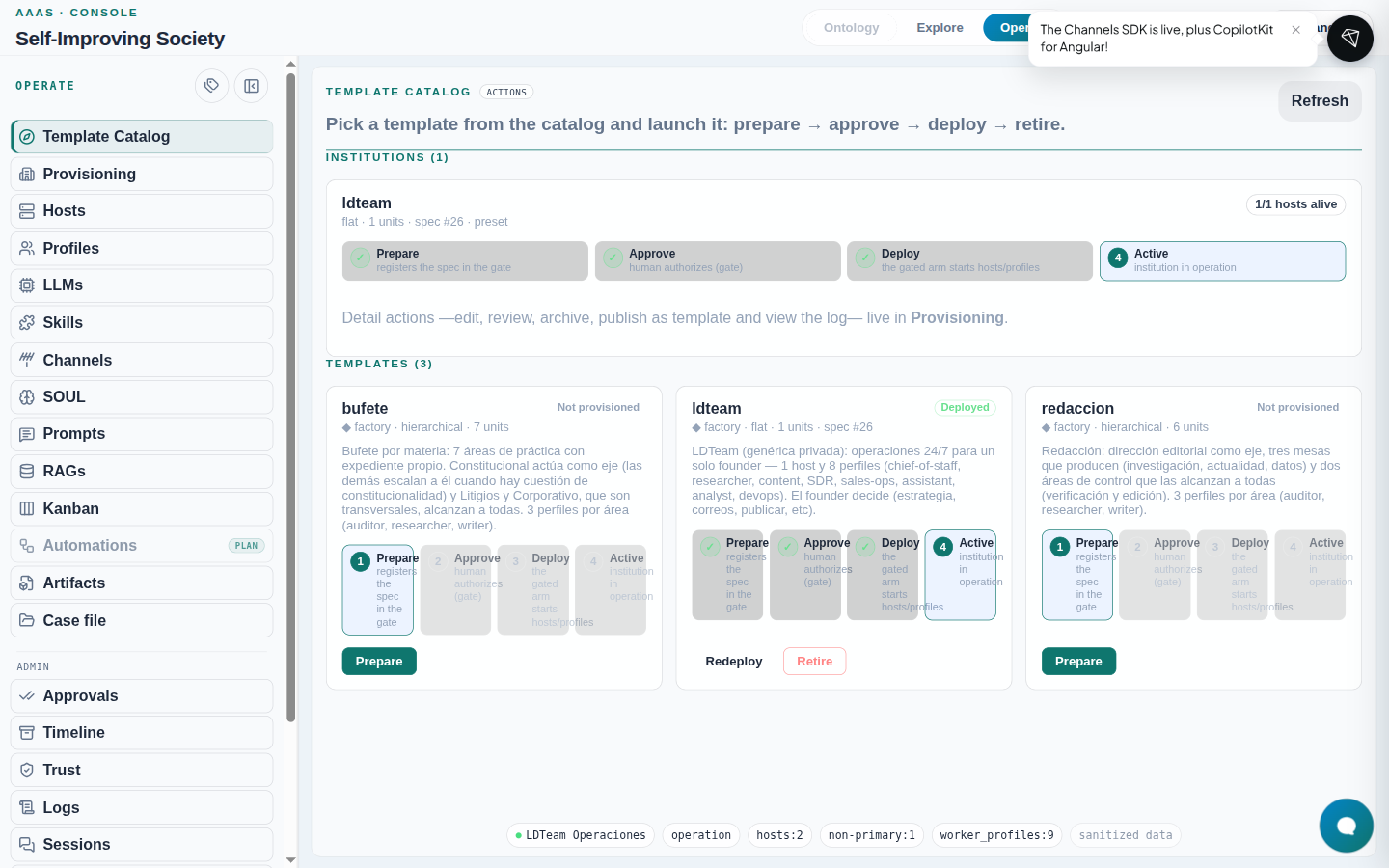
- Pending at gate — stepper with Prepare ✓ and Approve active. Still does not create hosts.
- Approve → Approved; Deploy appears. Still no containers.
- Deploy → gated arm applies the spec; institution becomes Active with
n/m hosts alive.

What to expect: after deploy, in ~10 s Hosts and Profiles refresh on their own.
If it fails: 403/409 on Deploy → executor M2M scopes (#79).
After Deploy (verification)
- Catalog —
ldteamActive,1/1 hosts alive. - Provisioning — Applied filter.
- Hosts + Profiles — live inventory.
Retire institution (scoped)
- Provisioning → Applied filter → Retire institution.
- Confirm by typing the exact name (e.g.
ldteam).
| Action | Where | Scope |
|---|---|---|
| Retire institution | Provisioning | One institution |
| Retire on catalog card | Catalog | May be global teardown |
| Fresh Reset | Dev | Full topology (Primary survives) |
CLI (same truth)
society builder deploy-approved --spec <yaml> --yes
society builder provision-profiles --spec <yaml> --yes
The CLI only hands you the command. Detail: runbook 13.
Presets
Operate → Dev → presets → Prepare → approve. The map preset is a historical example. MAP is not an institution in any environment.
What exists today
- IdentIA client install: no institution deployed (
institution_specs=0in ENVIRONMENTS). - Reference client:
ldteam+bufete-abogados. - Development: whatever you have applied in the working tree.
At bootstrap there is no institution: only the Primary Host (host-1 / society-agents-host) and the architect.